Master Chalk Lettering in Procreate with This Brush Set
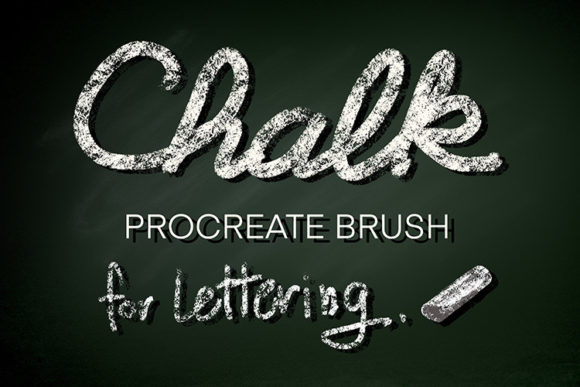
There is a distinct warmth and texture to chalk that digital tools often struggle to replicate. It feels organic, slightly imperfect, and inviting. For designers, educators, and content creators looking to inject that handmade feel into their iPad workflows, the Procreate Chalk Brush for Lettering offers a compelling solution. This isn't just another texture overlay; it is a specialized tool designed to mimic the friction and grain of real chalk on a blackboard or sidewalk, providing a level of control that suits everyone from complete beginners to seasoned illustrators.
When you download this asset, you aren't getting a single brush but a comprehensive .brushset file containing eight distinct chalk variations. Each brush within the set has been tuned to respond naturally to the Apple Pencil, capturing the nuance of pressure and tilt. Whether you are sketching out a quick idea or finalizing a client logo, having a toolkit that behaves predictably saves time and reduces frustration. The primary strength of this collection lies in its balance between realistic texture and digital ease of use.
Why Texture Matters in Digital Design
In an era where screens are incredibly sharp and vectors are perfectly smooth, adding texture can be the difference between a design that feels sterile and one that feels human. Chalk lettering specifically evokes nostalgia, approachability, and creativity. It suggests a classroom, a café menu, or a street artist's temporary masterpiece. Using the Procreate Chalk Brush for Lettering allows you to tap into these associations instantly.
Unlike standard round brushes that produce flat, uniform lines, these chalk brushes incorporate grain and opacity variation. As you draw faster, the texture becomes more apparent, simulating the way real chalk skips across a rough surface. This dynamic response adds depth to your work without requiring complex layer blending modes or post-processing effects. For marketers and bloggers, this means creating social media graphics that stand out in a feed full of polished, corporate imagery. For educators, it provides a way to make digital lesson plans feel more personal and engaging.
Key Characteristics and Usability
The standout feature of this brush set is its accessibility. Many textured brushes suffer from lag or unpredictable strokes, especially on older iPad models. However, this set is optimized for performance within Procreate 5 and later versions. The developers have ensured that the grain engine works seamlessly, meaning you get high-fidelity texture without sacrificing the smoothness of your stroke.
Control is paramount when lettering. You need a brush that respects your hand movements while adding its own character. These eight brushes vary slightly in grit and edge hardness. Some are perfect for thick, bold headlines that demand attention, while others are finer, ideal for intricate details or faux-calligraphy flourishes. Because they are digital, you also retain the ability to undo, resize, and recolor instantly—a luxury traditional chalk artists don't have. You can experiment with neon pinks or electric blues on a "blackboard" background without ever making a mess.
It is important to note that these are native Procreate assets. They will only function within the Procreate app on an iPad equipped with an Apple Pencil. To ensure compatibility and access to the latest rendering engines, you must update your software to at least Procreate 5. Once installed, the .brushset file imports all eight variants at once, ready to use immediately.
Practical Applications Across Industries
The versatility of chalk-style lettering extends far beyond simple doodles. Here is how different professionals can leverage this tool in their daily workflows:
- Small Business Owners and Cafés: Create eye-catching menu boards, daily specials signs, or window displays that can be printed or displayed on digital screens. The aesthetic signals freshness and artisanal quality.
- Educators and Tutors: Develop worksheets, presentation slides, or video thumbnails that mimic a classroom blackboard. This visual cue helps students mentally switch into "learning mode," even in a remote environment.
- Social Media Managers: Design Instagram stories or Pinterest pins that feel authentic and less "salesy." Chalk textures perform well for quotes, announcements, and behind-the-scenes content.
- Wedding Planners and Event Coordinators: Draft mockups for welcome signs, seating charts, and bar menus. Clients can visualize the final look before committing to physical chalk artists or printing costs.
- Freelance Illustrators: Incorporate hand-lettered titles into children's books, greeting cards, or editorial illustrations where a whimsical or rustic tone is required.
Enhancing Brand Identity and Engagement
Consistency in visual communication builds trust. If your brand identity leans towards the organic, handmade, or community-focused, integrating chalk lettering into your assets reinforces that message. Using the Procreate Chalk Brush for Lettering allows you to maintain this aesthetic across various platforms without needing to photograph actual chalkboards, which can be inconsistent due to lighting and camera quality.
Digital chalk art also offers superior scalability. A design created on an iPad can be exported at high resolution for large-format printing or scaled down for a mobile icon without losing the integrity of the texture. This flexibility is crucial for entrepreneurs who need to adapt their branding for everything from business cards to billboards. Furthermore, the speed of digital creation means you can iterate on designs rapidly. You can test five different headline styles in the time it would take to wipe and redraw a single physical board.
Tips for Getting the Most Out of Your Brushes
To truly master these tools, consider how you interact with the Apple Pencil. The pressure sensitivity is key. Pressing harder will deposit more "chalk," creating opaque, solid lines, while a lighter touch reveals the grain of the canvas underneath. Experiment with the tilt function as well; angling the pencil can create broader, softer strokes similar to using the side of a real piece of chalk.
Canvas selection also plays a role. While these brushes shine on dark backgrounds, don't be afraid to try them on textured paper templates or colored backgrounds. Changing the blend mode of your layer to "Multiply" or "Overlay" can integrate the chalk texture into the background, making it look like it was drawn directly onto the surface rather than floating on top.
Remember that simplicity often yields the best results. Chalk lettering is inherently informal. Avoid over-complicating your compositions with too many decorative elements. Let the texture of the brush do the heavy lifting. Pair your lettering with simple icons or borders drawn with the same brush set to maintain visual cohesion.
Ultimately, the value of this tool lies in its ability to bridge the gap between traditional artistry and digital efficiency. It empowers you to create work that feels tactile and warm, regardless of your physical location or skill level. Whether you are decorating a digital planner, branding a new product, or teaching a class, the Procreate Chalk Brush for Lettering provides the reliability and aesthetic charm needed to elevate your projects.