Evaluating the Procreate Brush Stamp Rainbow Set for Digital Design Projects
For digital artists and designers working within the iPad ecosystem, the choice of brush assets often dictates the efficiency and aesthetic quality of a project. Among the myriad of resources available, the Procreate Brush Stamp Rainbow set represents a specific category of tool designed for rapid decoration and thematic consistency. This collection, which includes 15 individual hand-drawn stamps, offers a focused approach to adding whimsical, colorful elements to digital canvases. Understanding where this tool fits within a broader design workflow requires an evaluation of its specific features, compatibility constraints, and practical applications compared to other methods of creating similar graphics.
Defining the Asset: Structure and Composition
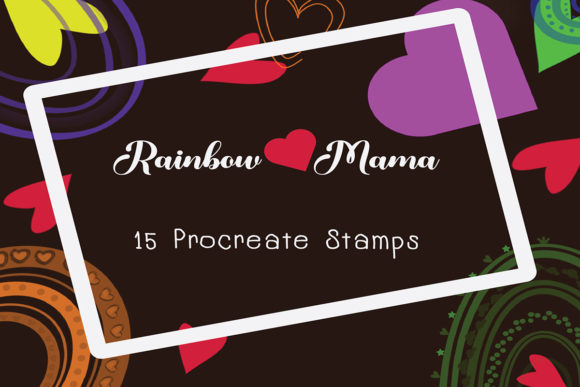
The core value of the Procreate Brush Stamp Rainbow lies in its curated composition. Unlike general texture brushes that rely on continuous strokes to create effects, this set functions as a library of discrete graphical elements. The package contains exactly 15 stamps, divided into three distinct thematic groups: five rainbow shapes, seven heart variations, and three word-based stamps. This segmentation allows users to quickly access specific motifs without scrolling through hundreds of unrelated options.
Each stamp is hand-drawn directly within the Procreate environment, ensuring that the line weight and organic imperfections align naturally with other native Procreate tools. A significant advantage of this format is its flexibility. While they are pre-drawn stamps, they are not static images locked at a single size or color. Users can scale these brushes up or down without losing resolution, adjust opacity to create layered depth, and, crucially, change the color dynamically. This ability to recolor stems from the brush settings rather than the image file itself, allowing a single rainbow stamp to match any brand palette or mood board instantly.
Workflow Efficiency: Stamps vs. Manual Illustration
When deciding whether to utilize a stamp set like the Procreate15 Brush Stamp Rainbow Love Mama collection versus drawing elements from scratch, the primary tradeoff is between customization and speed. For professionals managing tight deadlines, such as social media managers creating daily Instagram posts or stationery designers producing bulk invitations, the time saved by tapping a pre-made stamp is substantial. Instead of constructing a perfect heart or gradient rainbow for every new layout, the designer can place the element in seconds and focus on composition and typography.
However, this efficiency comes with a limitation in uniqueness. Because these are standardized stamps, every user with the same set has access to identical shapes. For high-end, bespoke illustration work where every line must be unique to the artist's hand, relying too heavily on stamps can make a portfolio feel generic. The Procreate Brush Stamp Rainbow is best viewed as a supplementary tool—ideal for embellishments, borders, and background patterns—rather than the primary subject of a fine art piece. It excels in "boho wall art" and surface patterns where repetition is often a desired stylistic choice rather than a flaw.
Technical Compatibility and Ecosystem Constraints
A critical factor in evaluating this resource is its strict hardware and software dependency. These brushes are engineered exclusively for the Procreate application on iPad. They require an iPad Pro or a compatible iPad model paired with an Apple Pencil or a pressure-sensitive stylus to function correctly. This specificity ensures optimal performance, as the brush engine can leverage the device's processing power for smooth rendering and pressure sensitivity (even though stamps are tap-based, the underlying engine affects how they interact with other layers).
It is vital for potential users to understand that these files do not work in Adobe Photoshop, Affinity Designer, or any desktop-based illustration software. The file format is proprietary to Procreate (.brushset). For designers who operate in a hybrid environment—starting concepts on an iPad but finalizing layouts in Photoshop on a desktop—this creates a friction point. To use these elements outside of Procreate, one would need to create a design within the app, export it as a PNG with a transparent background, and then import that flat image into other software. This extra step negates the benefit of having an editable brush and should be considered when choosing resources for a cross-platform workflow.
Practical Applications and Use Cases
The versatility of the Procreate Brush Stamp Rainbow makes it suitable for a wide array of projects beyond simple doodling. Its utility is most pronounced in sectors requiring cheerful, approachable aesthetics. For example, in the realm of printable stationery, these stamps can be used to create custom headers for planners, decorative corners for greeting cards, or icons for educational worksheets. The inclusion of word stamps alongside graphic shapes allows for quick assembly of motivational quotes or event titles, streamlining the creation of blog buttons or Pinterest graphics.
In the context of packaging design and product labeling, particularly for small businesses selling handmade goods, these stamps offer a cost-effective way to generate branding elements. A seller of organic soaps or children's clothing might use the heart and rainbow motifs to create patterned tissue paper or sticker designs without hiring a graphic designer for custom vector work. The ability to resize and recolor means the same asset can adapt to different product lines or seasonal campaigns. Furthermore, for content creators, these tools facilitate the rapid production of cohesive visual themes across blog posts and social media stories, helping to maintain brand recognition through consistent visual markers.
Installation and Usability Considerations
The barrier to entry for using this tool is low, provided the user is already familiar with the Procreate interface. The delivery method is a standard ZIP file containing the brush set. The process involves unzipping the file on the iPad and tapping the brush file to trigger an automatic import into the Procreate brush library. Once installed, the workflow is intuitive: select the brush, choose a color from the palette, and tap the canvas. There is no need for complex configuration or calibration.
However, users should be aware of file management best practices. Since the set includes 15 distinct brushes, it is advisable to keep them in a dedicated group within the Procreate brush panel to avoid cluttering the default library. Additionally, while the stamps are scalable, extreme enlargement beyond their intended resolution may reveal pixelation, although the vector-like nature of Procreate's brush engine mitigates this better than standard raster images. Testing the stamps at various sizes before committing to a final design is a prudent step to ensure crisp edges.
Making the Decision: Is This Resource Right for You?
Deciding to integrate the Procreate Brush Stamp Rainbow into your toolkit depends largely on your specific design needs and hardware setup. If you are an iPad-only creator focusing on digital planning, social media content, or printable crafts, this set offers high value through its time-saving capabilities and cohesive aesthetic. The hand-drawn quality provides a human touch that purely geometric vector shapes often lack, appealing to audiences looking for warmth and authenticity in design.
Conversely, if your work demands absolute uniqueness in every stroke, or if your primary workflow resides in desktop software like Photoshop or Illustrator, this tool may offer limited utility. The inability to edit the path of the stamp (as one would with a vector) means you are confined to the shape provided, albeit with color and size modifications. Ultimately, this brush set serves as a specialized accelerator for specific styles rather than a universal solution. For those who fit the profile of creating fun invitations, boho decor, or engaging digital content, it represents a practical investment that bridges the gap between manual illustration and template-based design.