Evaluating the Procreate Brush Stamp Winter Scarf Color Set for Seasonal Digital Illustration
Digital illustration offers unparalleled flexibility, yet artists often face the challenge of balancing speed with texture. The Procreate Brush Stamp Winter Scarf Color set addresses this specific niche by providing a collection of pre-textured stamps designed to replicate the intricate knit patterns of winter apparel. For illustrators working on seasonal projects, character design, or greeting cards, understanding the utility and limitations of stamp-based tools versus traditional painting methods is essential. This evaluation explores how this specific brush set functions within the Procreate ecosystem, its comparative advantages, and the practical considerations required before integrating it into your workflow.
Understanding the Mechanics of Stamp-Based Texturing
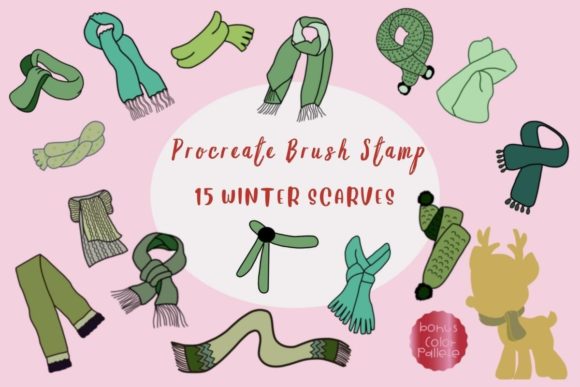
At its core, the Procreate Brush Stamp Winter Scarf Color resource is not a standard painting brush but a collection of 15 individual stamp brushes. Unlike a round or textured brush that lays down pigment based on stroke velocity and pressure, a stamp brush applies a static image—a "stamp"—onto the canvas each time you tap or drag. In this specific set, those stamps are high-fidelity representations of scarf knits, cables, and weaves.
The distinct advantage here lies in consistency. Hand-painting a complex cable knit pattern requires significant skill and time to ensure the repeating motifs align correctly. These stamps bypass the repetitive labor, allowing the artist to focus on composition and lighting. However, this convenience comes with a trade-off: the loss of organic variability found in hand-drawn lines. While the brushes allow for scaling, resizing, color changes, and opacity adjustments, the underlying shape remains fixed unless manipulated further with transformation tools. This makes the set ideal for background elements, clothing details on secondary characters, or rapid prototyping, though purists may find the repetition noticeable if overused without variation.
Integration with the Bonus Color Palette
A critical component of this resource is the included Procreate Brush Stamp Winter Scarf Bonus Color Palette. Texture and color are inextricably linked in textile illustration; a wool texture looks fundamentally different in a muted sage green compared to a vibrant crimson. The included palette, containing 30 curated swatches, is designed to complement the specific lighting and shadow characteristics embedded in the stamp textures.
When evaluating alternatives, many brush sets provide the geometry but leave color selection entirely to the user. While this offers freedom, it can lead to decision fatigue or clashing tones that flatten the 3D illusion of the knit. By pairing the stamps with a cohesive palette, the creator reduces the cognitive load on the artist. The colors are likely selected to mimic natural dyes and seasonal trends, ensuring that when you apply a stamp, the shading within the texture itself reacts believably to the chosen hue. This synergy between the brush shape and the color data is a significant value add, particularly for artists who need to maintain a consistent mood across a series of illustrations.
Technical Requirements and Platform Limitations
Before committing to this tool, it is vital to address the hardware and software constraints. The Procreate Brush Stamp Winter Scarf Color set is exclusively built for the iPad ecosystem. To utilize these brushes effectively, you must possess an iPad Pro (or a compatible iPad model), an Apple Pencil, or a third-party pressure-sensitive stylus, along with the Procreate app.
This exclusivity is a major decision factor. If your workflow involves cross-platform collaboration—switching between a desktop workstation and a tablet—this resource introduces friction. These brushes do not work in Photoshop, Clip Studio Paint, or any other desktop application. The file format (.brushset) is proprietary to Procreate. Consequently, if you are part of a studio pipeline that relies on layered PSD files edited across different operating systems, you cannot simply import these stamps into your master file on a PC. You would need to rasterize the stamped layer on the iPad before exporting, which limits future editability. For freelancers who specialize solely in the iPad environment, this is a non-issue; for generalists, it represents a potential bottleneck.
Installation and Workflow Efficiency
The efficiency of digital tools is often judged by the ease of setup. This product is delivered as a single ZIP file containing the Winter_Scarves.brushset and the Catch_Up_Christmas_.swatches file. The installation process on iPadOS is generally seamless but requires specific steps that differ from desktop software.
Users must unzip the file directly on their iPad, typically using the Files app. Once extracted, tapping the files should trigger an automatic import into Procreate. If the automatic handshake fails, the manual "Share" method is required: locating the file, selecting "Share," and choosing "Open in Procreate." While straightforward for experienced iPad users, this can be a hurdle for those transitioning from desktop-centric habits where drag-and-drop installation is universal. Furthermore, once imported, the brushes appear in a dedicated set within the Brush Library, keeping your workspace organized. The ability to immediately access 15 variations allows for rapid iteration—you can test a chunky knit against a fine weave in seconds, a process that might take minutes to sketch manually.
Comparative Analysis: Stamps vs. Hand-Painting vs. Vector Patterns
To determine if this tool is the right fit, one must compare it against alternative approaches to rendering textiles.
- Hand-Painting: The primary alternative is painting the texture from scratch using standard textured brushes.
Pros: Offers total control over every loop and thread; creates unique, non-repetitive patterns that feel more organic.
Cons: Extremely time-consuming; requires advanced understanding of light and form to sell the illusion of depth.
Verdict: Choose hand-painting for hero assets or close-up portraits where texture uniqueness is paramount. - Vector Patterns: Using vector software to create repeating knit patterns.
Pros: Infinitely scalable without quality loss; mathematically perfect repeats.
Cons: Can look too sterile or "digital"; lacks the painterly imperfections that give warmth to winter illustrations; harder to blend with raster painting styles.
Verdict: Best for graphic design and print layouts, less suitable for illustrative storytelling. - Procreate Brush Stamp Winter Scarf Color:
Pros: Strikes a balance between speed and aesthetic quality; includes built-in lighting cues via the stamp shape; integrates naturally with other Procreate painting tools.
Cons: Fixed resolution limits extreme scaling; potential for visible repetition if the same stamp is used excessively without modification.
Verdict: The optimal choice for illustrators needing to populate scenes with multiple characters wearing winter gear quickly without sacrificing a hand-crafted look.
Strategic Use Cases and Limitations
The Procreate Brush Stamp Winter Scarf Color set shines in specific scenarios. It is exceptionally useful for creating pattern fills on clothing where the fabric is not the focal point but needs to read clearly as "wool" or "knit." For example, in a busy holiday market scene, painting detailed knits for every passerby is inefficient. Using these stamps allows an artist to establish texture instantly, then use erasers and smudge tools to break up the pattern and integrate it with the character's form.
However, users must be wary of the "stamped" look. Because the brushes are images, rotating or scaling them too aggressively can degrade the pixel quality or make the repetition obvious. The 15 individual stamps provided offer variety, but they are finite. A skilled user will mix the stamps, rotate them at slight angles, and adjust opacity to mask their origin. Relying on a single stamp for an entire garment will result in a tiled appearance that breaks immersion.
Additionally, the reliance on the bonus palette suggests that the stamps may have been painted with specific lighting assumptions. If you attempt to use a neon green or a flat black outside the recommended palette, the internal shading of the stamp might conflict with your scene's light source, requiring additional painting to correct. This necessitates a hybrid approach: using the stamp as a base, then painting over it to unify the lighting.
Making the Decision
Ultimately, the decision to acquire the Procreate Brush Stamp Winter Scarf Color set depends on your specific workflow needs and hardware environment. If you are an iPad-exclusive illustrator looking to streamline your holiday commissions or concept art, the time saved on rendering textiles can be redirected toward composition and storytelling. The inclusion of the color palette adds a layer of cohesion that simplifies the coloring process.
Conversely, if you require cross-platform compatibility, work primarily in vector, or prioritize 100% hand-drawn organic textures for fine art pieces, this tool may feel restrictive. It is a specialized instrument designed for a specific aesthetic and platform. When used with an understanding of its mechanics—mixing stamps, adjusting scales, and respecting the platform limitations—it serves as a powerful accelerator for winter-themed digital art, bridging the gap between rapid production and high-quality textural detail.