Evaluating the Procreate Brush Stamp Sunflowers Set for Digital Art
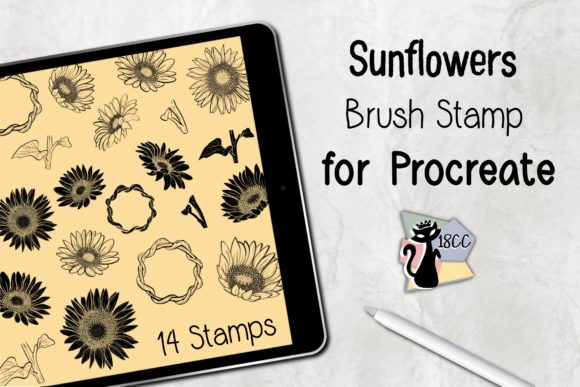
Digital illustration on the iPad has become a cornerstone of modern creative workflows, offering artists a portable and versatile studio. Within this ecosystem, specialized tools like the Procreate Brush Stamp Sunflowers set serve as significant time-savers and stylistic enhancers. This collection, featuring 14 distinct sunflower stamps, is designed specifically for the Procreate application. For artists considering whether to integrate this specific asset into their library, it is essential to look beyond the visual appeal and evaluate its practical utility, technical requirements, and fit within various design scenarios.
Understanding the Tool and Its Functionality
The Procreate Brush Stamp Sunflowers set is not a traditional painting brush that simulates bristles or fluid dynamics. Instead, it functions as a stamping tool. Each of the 14 included stamps represents a pre-rendered sunflower element, varying in angle, bloom stage, or artistic style. When applied to the canvas, these stamps allow users to place complex floral imagery instantly without needing to paint each petal and leaf from scratch.
This distinction is crucial for potential users. If your goal is to practice botanical illustration techniques or learn how to render light and shadow on organic forms manually, a stamp set may not align with those educational goals. However, if your objective is to incorporate high-quality floral elements into larger compositions, patterns, or greeting cards efficiently, this tool offers a streamlined solution. The set is distributed as a single .brushset file within a ZIP archive, ensuring that all 14 variations are installed simultaneously into the Procreate brush library.
Primary Benefits and Workflow Efficiency
The most compelling argument for adopting the Procreate Brush Stamp Sunflowers is the significant reduction in production time. Creating realistic or stylized sunflowers manually requires a steady hand, an understanding of anatomy, and considerable time investment. For professionals working on tight deadlines, such as surface pattern designers or social media content creators, the ability to deploy consistent, high-quality floral assets instantly is a major advantage.
Furthermore, consistency is a key benefit. When creating repeating patterns or a series of greeting cards, maintaining uniformity across different illustrations can be challenging when drawing freehand. Using a standardized stamp set ensures that the core floral elements remain consistent, allowing the artist to focus on composition, color grading, and background textures. This makes the set particularly effective for:
- Surface Pattern Design: Quickly populating seamless repeats with floral motifs.
- Greeting Card Creation: Assembling elegant layouts for birthdays, weddings, or thank-you notes.
- Scrapbooking and Journaling: Adding decorative elements to digital planners without cluttering the workflow.
- Composite Art: Using the flowers as foreground or background elements in broader landscape or portrait pieces.
Technical Requirements and Compatibility
Before acquiring or utilizing this tool, users must verify their hardware and software environment. The Procreate Brush Stamp Sunflowers set is exclusively compatible with the Procreate application on iPadOS. It requires Procreate Version 5.0 or higher. Users attempting to install this on older versions of the app may encounter errors or find that the stamps do not render correctly.
Hardware-wise, the tool is optimized for the iPad Pro or standard iPad models paired with an Apple Pencil or a compatible pressure-sensitive stylus. While the stamps themselves are static images, the pressure sensitivity of the stylus often controls the opacity or size of the stamp depending on how the brush behavior is configured within Procreate. It is important to note that this is a digital product; no physical items are shipped. The user must be comfortable downloading a ZIP file, extracting it on their iPad (using the Files app), and selecting "Open in Procreate" to complete the installation.
Considerations and Potential Tradeoffs
While the efficiency gains are clear, there are tradeoffs to consider. The primary limitation of any stamp-based tool is the lack of infinite customizability compared to hand-drawn elements. Although users can change the color of the stamps using Procreate's alpha lock or clipping masks, the underlying shape and texture remain fixed. Artists who require highly specific anatomical variations of sunflowers that differ from the 14 provided options may find the set restrictive.
Additionally, overuse of stamp brushes can sometimes lead to a "cookie-cutter" aesthetic if not handled with care. To maintain a professional and organic look, artists should consider modifying the stamps after placement. Techniques such as rotating individual stamps, adjusting their scale, varying their opacity, or painting over them with additional textures can help integrate the stamped elements more naturally into the artwork. Relying solely on the default output of the Procreate Brush Stamp Sunflowers without further manipulation may result in work that looks generic.
When to Choose This Set vs. Alternatives
Deciding whether this tool is the right fit depends largely on your specific project goals and skill level.
This set is a strong fit if:
- You are a professional designer needing to produce high volumes of floral content quickly.
- You enjoy composing scenes but prefer not to spend hours rendering individual flower details.
- You are a beginner looking to create polished artwork while you develop your fundamental drawing skills.
- Your workflow involves frequent creation of patterns or stationery where repetition is desired.
Alternatives may be worth considering if:
- Your primary goal is to learn botanical drawing techniques; in this case, reference photos and standard texture brushes would be more educational.
- You require vector-based scalability for large-format printing; Procreate is raster-based, so dedicated vector floral assets might be preferable for certain print jobs.
- You need a wider variety of flower species; this set is specialized strictly for sunflowers, so a general botanical bundle might offer better value for diverse projects.
Making the Decision
Incorporating the Procreate Brush Stamp Sunflowers into your digital toolkit is a strategic decision centered on balancing quality with efficiency. For artists who value speed and consistency in their floral designs, this 14-stamp collection offers a robust solution that integrates seamlessly into the Procreate environment. By understanding the technical prerequisites and acknowledging the limitations of stamp-based workflows, users can leverage this tool to enhance their creativity rather than limit it. Ultimately, if your projects involve card making, pattern design, or any composition where sunflowers play a central role, this brush set provides a practical foundation to build upon, allowing you to save time on execution and focus more on the artistic vision.