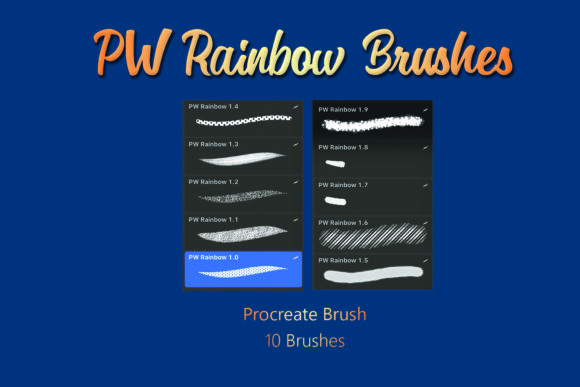
Evaluating the PW Rainbow Procreate Brush Glitter Brush Set for Digital Art
Digital illustration has evolved to include a vast array of textures and effects that mimic traditional media while offering unique capabilities impossible to achieve with physical tools. Among these capabilities, achieving realistic or stylized sparkle and shimmer is often a challenge for artists working on standard screens. The PW Rainbow Procreate Brush Glitter Brush set addresses this specific need by providing a curated collection of tools designed to integrate light-reflecting textures directly into digital workflows. This evaluation explores the utility, technical requirements, and practical applications of this digital asset to help artists determine if it aligns with their creative goals.
Understanding the Product and Technical Specifications
The core of this product is a specialized brush set designed exclusively for the Procreate application on iOS devices. It is not a standalone application but rather a digital add-on that expands the native functionality of Procreate. The package is delivered as a compressed .ZIP file, which contains a single .brushset file. Upon extraction and installation, this file unlocks ten distinct glitter brushes within the user's Procreate library.
It is critical to note the platform limitations immediately. These brushes only support the Procreate app on iOS. They are incompatible with Android tablets, desktop software like Adobe Photoshop or Clip Studio Paint, and web-based drawing tools. Furthermore, because this is a digital product, there is no physical shipment involved. The value lies entirely in the code and texture mapping contained within the brush files. Users must be comfortable downloading files, managing ZIP archives, and importing assets into their specific software environment.
Why Artists Seek Specialized Glitter Tools
Creating convincing glitter effects manually in digital art is time-consuming. Traditionally, an artist might paint individual highlights, adjust layer blending modes, or search for seamless texture overlays to simulate sparkle. While effective, these methods can disrupt the flow of painting and often result in repetitive patterns that look artificial.
The primary reason an artist would consider the PW Rainbow Procreate Brush Glitter Brush is efficiency combined with aesthetic consistency. By using a brush engine pre-configured with scatter, shape dynamics, and color variation, the artist can apply complex textures with a single stroke. The "Rainbow" aspect suggests that these brushes likely incorporate hue shifting or multi-color distribution, allowing for iridescent effects that change based on stroke direction or pressure. This is particularly valuable for genres such as fantasy illustration, character design involving magical elements, and decorative lettering where light interaction is a key focal point.
Benefits and Practical Applications
For users who already operate within the Apple ecosystem using an iPad and Procreate, the integration of this brush set offers several tangible benefits:
- Workflow Acceleration: Instead of spending hours crafting custom noise maps or adjusting layer styles, artists can apply finished textures instantly. This allows more time to focus on composition and lighting.
- Non-Destructive Editing: Like all Procreate brushes, these can be used on separate layers. This means the intensity, opacity, and blend mode of the glitter can be adjusted after the fact without altering the underlying artwork.
- Variety Within a Set: With ten different brushes included, the set likely offers variations in particle size, density, and sparkle shape. This prevents the "stamped" look that occurs when a single brush is overused.
- Enhanced Visual Depth: Properly applied glitter brushes can add a sense of three-dimensionality and atmospheric lighting to flat illustrations, making them pop on high-resolution Retina displays.
Situations where this tool is a strong fit include creating promotional graphics for social media, designing stickers, illustrating children's books with magical themes, or adding finishing touches to fashion sketches. Any project requiring a high degree of polish and specific light-refracting qualities stands to gain from specialized tools like these.
Considerations and Tradeoffs
While the advantages are clear for specific use cases, potential buyers must weigh certain tradeoffs. The most significant consideration is the dependency on hardware and software. If an artist switches from an iPad to a desktop workflow, or prefers vector-based illustration, these brushes become unusable. The investment is locked into the Procreate ecosystem.
Additionally, the effectiveness of glitter brushes relies heavily on the artist's understanding of light. A common pitfall for beginners is overusing texture brushes, resulting in artwork that looks noisy or cluttered. The PW Rainbow Procreate Brush Glitter Brush set provides the tool, but not the artistic judgment required to use it subtly. Users must understand how to control opacity and flow to ensure the glitter enhances rather than overwhelms the piece.
There is also the matter of file management. Since the product arrives in a .ZIP format, users must know how to extract files on their iOS device (typically using the Files app) before importing them into Procreate. For those unfamiliar with digital file structures, this initial setup step can be a minor hurdle, though it is a one-time process.
When to Consider Alternatives
This brush set may not be the optimal choice for every digital painter. Alternatives should be considered in the following scenarios:
- Cross-Platform Needs: If an artist works across iPad, Windows, and macOS, investing in a brush set that works only on iOS limits portability. In this case, purchasing texture packs compatible with multiple software suites or learning to create procedural textures might be a better long-term strategy.
- Minimalist Aesthetics: Artists focusing on flat design, cel shading, or minimalist line work may find glitter effects unnecessary. The visual language of these styles often conflicts with the complexity of particle brushes.
- Budget Constraints for General Tools: If an artist's library lacks fundamental tools like basic inking, shading, or blending brushes, prioritizing a niche effect brush like this may not be the best allocation of resources. Mastering core fundamentals usually yields higher returns than acquiring specialty effects early on.
- Desire for Customization: Advanced users who prefer building their own brushes from scratch to achieve exact specifications might find pre-made sets limiting. Procreate allows for deep brush customization, and some artists prefer the control of engineering their own sparkle mechanics.
Making the Decision
Deciding whether to acquire the PW Rainbow Procreate Brush Glitter Brush ultimately depends on your current workflow and artistic intentions. If you are an iPad-based illustrator looking to streamline the process of adding magical or decorative elements to your work, this set offers a focused solution. The inclusion of ten varied brushes provides enough diversity to handle different scales and intensities of sparkle, potentially saving significant production time.
However, if you do not use Procreate, or if your style leans towards realism where hand-painted highlights are preferred over textured stamps, this product may not serve your needs. It is a specialized instrument rather than a foundational tool. For those who fit the target demographic—iOS users creating vibrant, light-filled imagery—this digital download represents a practical enhancement to their existing toolkit, provided they are prepared to manage the file installation and apply the effects with artistic restraint.