Integrating the Procreate Eucalyptus Lavender Toolkit into Professional Digital Workflows
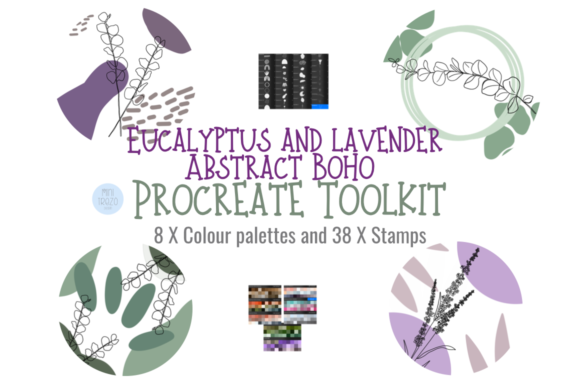
In the landscape of modern digital creation, efficiency often hinges on the quality of your foundational assets. For illustrators, product designers, and small business owners utilizing the iPad ecosystem, the Procreate Eucalyptus Lavender Toolkit represents more than just a collection of artistic stamps; it is a strategic resource designed to streamline the production of high-quality visual content. This suite of 38 unique individual hand-drawn digital brushes serves as a bridge between raw creative intent and polished final deliverables, fitting seamlessly into workflows ranging from bespoke client projects to scalable print-on-demand operations.
Understanding where this toolkit fits within a broader creative process is essential for maximizing its utility. Unlike generic texture packs that require significant manipulation to look authentic, these elements are pre-styled with a specific botanical aesthetic—combining the organic softness of eucalyptus with the delicate hues of lavender. This specificity allows creators to bypass the time-consuming phase of sketching base flora from scratch, enabling a focus on composition, color theory, and layout execution.
Strategic Placement in the Creative Lifecycle
The integration of the Procreate Eucalyptus Lavender Toolkit can occur at various stages of a project, depending on the nature of the deliverable. In a typical commercial workflow, such as designing a line of greeting cards or wedding invitations, these brushes function most effectively during the asset generation and composition phases.
Pre-Production and Planning: Before opening the canvas, successful implementation requires ensuring your hardware and software environment is ready. These files are digital brushes exclusive to the Procreate App. To utilize them, you must have an iPad Pro (or compatible iPad model) equipped with the Procreate application and an Apple Pencil. Attempting to use these assets without this specific hardware-software combination will result in incompatibility. Furthermore, a reliable file management system, such as iCloud, is necessary to download and transfer the brush set from the point of purchase to your device. This preparation phase ensures that when inspiration strikes, technical barriers do not interrupt the flow state.
Execution and Composition: Once the environment is set, the toolkit shines during the actual creation process. The 38 unique brushes offer a variety of botanical elements that can be dragged and dropped onto the canvas. A highly effective method for using these stamps involves treating them as underpaintings or guides rather than final static images. By selecting a stamp, placing it on the canvas, and immediately reducing the layer opacity, artists can create a subtle guide. On a new layer above this guide, they can trace or paint over the shape with custom colors or additional textures. This technique preserves the organic, hand-drawn feel of the original stroke while allowing for complete customization to match specific brand palettes or lighting conditions.
Advanced Techniques for Texture and Depth
To elevate the output from simple clip art to professional-grade illustration, one must leverage Procreate's layer blending capabilities. The Procreate Eucalyptus Lavender Toolkit is explicitly designed to interact well with textures and clipping masks. When building complex scenes, such as wall art or wrapping paper patterns, place a paper texture or watercolor wash on a layer beneath your botanical elements. Then, apply a clipping mask to the brush layer. This confines the visibility of the eucalyptus and lavender shapes strictly to the texture below, creating the illusion that the botanicals were painted directly onto textured paper.
This approach is particularly valuable for creators working in the print-on-demand sector. Consistency in texture across different products—from phone cases to tote bags—builds brand recognition. By standardizing the texture layers used in conjunction with this toolkit, entrepreneurs can ensure that their digital storefront maintains a cohesive aesthetic identity, regardless of the specific product being displayed.
Resizing and Recoloring for Versatility
A common concern when adopting pre-made assets is the limitation on scalability and color variation. However, this brush pack is engineered for flexibility. Every element within the toolkit can be resized and recolored to suit specific project requirements. There are two primary methods for achieving this within the Procreate interface:
- Brush Resize Tool: Within the brush studio settings, users can adjust the size of the stamp dynamically before applying it to the canvas. This is ideal for rapid iteration when populating a background pattern where elements need to vary in scale naturally.
- Move and Resize Tool: Once a stamp is placed on the canvas, the standard transformation tool allows for precise scaling, rotation, and positioning. This is crucial for fine-tuning compositions in editorial illustrations or detailed scrapbooking layouts.
Recoloring is equally straightforward. Because these are digital brushes creating pixel-based layers, the "Alpha Lock" feature can be enabled on the specific layer containing the botanical element. Once locked, any new color applied with a standard fill or brush tool will only affect the existing pixels, leaving the transparent background untouched. This allows a single eucalyptus sprig to be transformed from a muted sage green to a vibrant teal instantly, adapting the asset to seasonal campaigns or specific client branding guidelines without losing the hand-drawn integrity of the stroke.
Application Across Diverse Industries
The versatility of the Procreate Eucalyptus Lavender Toolkit extends beyond traditional illustration. Its utility spans several professional domains where visual communication is paramount.
Marketing and Social Media: Content creators and marketers can use these elements to frame text overlays, create story highlights, or design promotional graphics. The organic nature of the lavender and eucalyptus motifs resonates well with audiences interested in wellness, lifestyle, and eco-friendly products. By integrating these brushes into social media templates, brands can produce consistent, high-volume content without the fatigue of drawing new assets daily.
Educational Resources and Planners: Educators and publishers developing digital planners or educational worksheets can utilize these stamps to add visual interest without distracting from the core content. The soft, neutral tones of the palette ensure that text remains legible while the page feels inviting and structured. For DIY enthusiasts creating digital planners for sale, these brushes provide a premium look that justifies higher price points compared to generic, computer-generated vectors.
Event Design and Stationery: For those specializing in weddings or corporate events, the toolkit offers a rapid prototyping solution for invitations and programs. Designers can quickly mock up multiple layout variations by swapping different brush stamps from the set, allowing clients to visualize options before finalizing the print run. The ability to export these designs at high resolutions ensures they are ready for professional offset printing or high-quality home printing setups.
Maintaining Quality Control and Organization
As with any digital asset library, long-term efficiency depends on organization. When downloading the instant files, it is advisable to establish a dedicated folder structure within your cloud storage (e.g., iCloud Drive) specifically for Procreate assets. Labeling folders by theme, such as "Botanicals," "Textures," or "Seasonal," prevents clutter as your library grows.
Furthermore, maintaining a "sandbox" file—a blank Procreate document where you test new brushes—is a best practice. Before deploying the Procreate Eucalyptus Lavender Toolkit in a client project, spend ten minutes testing how the stamps interact with your preferred color palettes and texture overlays. This preliminary step helps you understand the opacity behaviors and edge characteristics of the brushes, ensuring that you can execute the actual project with confidence and speed.
Ultimately, the value of this toolkit lies in its ability to reduce the friction between idea and execution. By providing high-quality, adaptable, and aesthetically pleasing botanical elements, it allows professionals to focus on the strategic aspects of their work—storytelling, brand alignment, and user engagement—while the tools handle the heavy lifting of detailed rendering. Whether you are a freelancer managing tight deadlines or a hobbyist looking to elevate personal projects, integrating these hand-drawn digital brushes offers a tangible upgrade to your creative output.