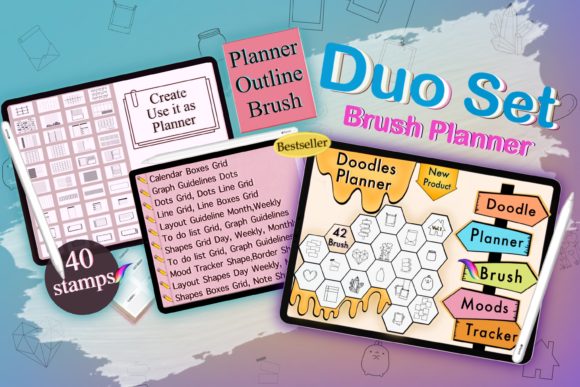
Evaluating the Procreate Planner Brush Stamp for Digital Planning
Digital planning has evolved from a niche hobby into a robust workflow for students, professionals, and creatives seeking organization without the physical bulk of paper. At the heart of this ecosystem is the Procreate Planner Brush Stamp, a specialized digital tool designed to streamline the creation of calendars, headers, and structural elements within the Procreate app on iPad. Unlike standard drawing brushes that create strokes based on movement, these stamp brushes deposit pre-designed graphics—such as monthly grids, day labels, and decorative frames—with a single tap. Understanding the utility, limitations, and specific use cases of these tools is essential for anyone looking to optimize their digital bullet journal or planner setup.
What Defines a Planner Brush Stamp?
A Procreate Planner Brush Stamp functions as a shortcut for repetitive design tasks. In the context of digital planning, users often need to recreate consistent layouts, such as a January calendar grid or a "Monday" header, across hundreds of pages. Manually drawing lines, typing dates, or importing individual PNG images for every page can be time-consuming and inconsistent. Stamp brushes solve this by embedding the image directly into the brush engine. When selected and tapped on the canvas, the brush stamps the image at its native resolution.
The specific bundles available as instant digital downloads typically include comprehensive sets covering all twelve months. A robust collection often provides both Monday-start and Sunday-start variations to accommodate different regional or personal preferences. With a total count ranging between 40 to 42 brushes per set, these tools cover the entire annual cycle. The underlying files usually feature transparent backgrounds, allowing the stamped image to sit seamlessly over any colored background, texture, or pattern the user chooses within their planner document.
Operational Benefits and Workflow Efficiency
The primary argument for integrating a Procreate Planner Brush Stamp into your workflow is efficiency. For users who build their own planners from scratch or heavily customize pre-made templates, the time saved is significant. Instead of sourcing separate image files and using the "Add Photo" function repeatedly, the brush library offers immediate access. This reduces the number of taps required to populate a page, maintaining the creative flow state that many digital artists value.
Furthermore, these stamps offer a degree of flexibility that static templates do not. Because the stamped image acts as a pixel layer within Procreate, it can be resized, rotated, and recolored using the alpha lock feature. If a user decides mid-project that their January header should be pastel blue instead of black, they can simply fill the layer with a new color. Additionally, the ability to toggle background layers allows users to export specific elements as transparent PNGs. This means a single brush set can serve a dual purpose: creating layouts directly in Procreate or generating assets for use in other applications like GoodNotes or Notability.
Customization and Creative Control
One of the distinct advantages of using handmade stamp brushes is the aesthetic cohesion they provide. Many commercial planner templates feel generic because they are used by thousands of people. By utilizing a digital download of hand-drawn or uniquely styled stamps, planners can maintain a personalized look while still benefiting from structural consistency. The transparent background feature is particularly critical here; it ensures that the stamps adapt to the user's chosen theme rather than forcing the user to adapt to a white box surrounding the graphic.
Considerations and Potential Tradeoffs
While the benefits are clear, prospective users must evaluate whether this tool aligns with their technical setup and planning style. The most significant constraint is hardware dependency. These brushes function exclusively within the Procreate app on iPadOS. They require an Apple Pencil or compatible stylus for optimal navigation, although finger tapping works for stamping. Users relying on Android tablets, desktop computers, or web-based planning tools will find these brushes incompatible.
Another consideration is the learning curve associated with Procreate's brush studio. While stamping is simple, managing large libraries of brushes requires organizational skills. Users must understand how to import .brushset files, categorize them, and adjust settings like size limits. For someone who prefers a "plug-and-play" experience without configuring software, the initial setup might feel daunting compared to simply opening a pre-made PDF planner.
There is also the matter of resolution. Stamp brushes are raster-based. If a user constantly scales a small stamp up to fit a massive canvas, pixelation may occur. High-quality sets are designed with high-resolution source images to mitigate this, but users working on unusually large canvases should verify the DPI (dots per inch) of the brush set before purchasing to ensure print-quality output if that is their end goal.
Ideal Use Cases vs. Alternatives
The Procreate Planner Brush Stamp is a strong fit for specific types of users. It is ideal for "hybrid" planners who enjoy the artistic process of setting up their journals but want to minimize the tedious aspects of drawing grids and writing dates. It is also highly valuable for content creators who produce planning videos or sell their own digital planner layouts, as it speeds up production time significantly. If your goal is to create a new product style every year or refresh your bullet journal with unique monthly themes without starting from zero, these brushes provide the perfect foundation.
However, alternatives may be worth considering for different needs. If your primary goal is strict data entry, task management, and searchability, a dedicated note-taking app with text recognition (OCR) might be superior. Procreate is an art app; it does not natively support clickable hyperlinks within the document in the same way PDF annotation apps do, nor does it offer cloud syncing across non-Apple devices. Users who prioritize cross-platform accessibility or complex database features should look toward tools like Notion or Obsidian rather than investing in Procreate assets.
Making the Decision
Deciding to purchase a Procreate Planner Brush Stamp bundle comes down to evaluating your relationship with the planning process. If you view planning as a creative ritual where the setup is part of the enjoyment, but you wish to reduce friction, these tools offer an excellent balance. They remove the monotony of date-entry while preserving the freedom to decorate, color, and arrange your space artistically.
Before downloading, verify that the package includes the specific start-of-week preference you need (Monday vs. Sunday) and check if the seller provides updates for future years, although the nature of stamp brushes often allows the month shapes to be reused indefinitely with manual date updates if desired. Ultimately, these brushes are not just about saving time; they are about enhancing the digital project with a level of polish and consistency that elevates the overall planning experience. For iPad users committed to the Procreate ecosystem, they represent a practical investment in long-term organizational efficiency.